Choosing the right iPad in 2026 is no longer just about buying a tablet. It is about investing in a device that can improve productivity, simplify learning, support creativity, and even replace a traditional laptop for many everyday tasks.
Whether you’re a university student taking digital notes, an office professional attending online meetings, a business owner managing your company on the go, or a content creator producing social media content, Apple’s iPad lineup offers a model designed specifically for your needs.
This guide helps you compare every current iPad model without focusing solely on specifications. Instead, we’ll explain which iPad best fits different lifestyles, learning environments, and professional workflows, making it easier to choose the right device before purchasing an installment plan in Rangsit.
Why iPad Has Become Essential for Both Students and Professionals
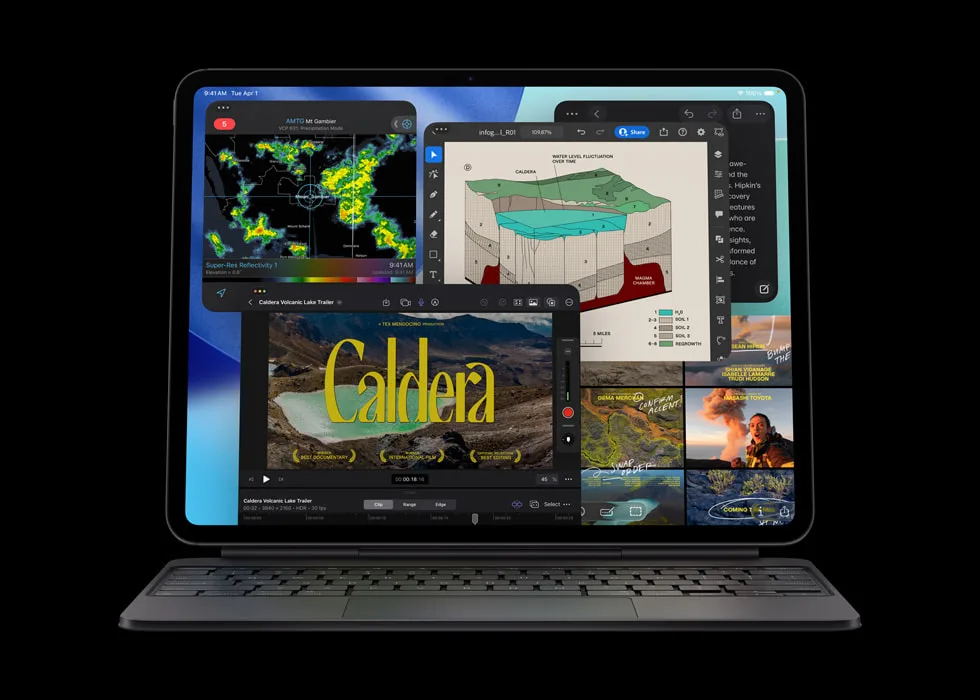
Over the past several years, the iPad has evolved from a media consumption device into a complete productivity platform. With powerful Apple Silicon processors, advanced multitasking features, Apple Pencil support, Magic Keyboard compatibility, and a constantly improving iPadOS, many users now rely on iPad as their primary computing device.
- Take handwritten notes digitally.
- Attend online classes and virtual meetings.
- Create presentations and business documents.
- Edit photos and videos.
- Manage cloud storage and collaborative projects.
- Draw, sketch, and design professionally.
- Work efficiently from virtually anywhere.
The flexibility of iPad allows users to move seamlessly between studying, working, entertainment, and creative tasks using a single portable device.
What Should You Consider Before Choosing an iPad?
1. Your Primary Use Case
The first question should never be “Which iPad is the newest?” Instead, ask yourself how you actually plan to use it every day.
Reading textbooks, attending lectures, creating spreadsheets, editing videos, illustrating artwork, managing online businesses, or joining meetings all require different levels of performance. Choosing based on your workflow usually leads to greater long-term satisfaction than simply buying the highest-end model.
2. Display Size
A larger display improves multitasking, document editing, and split-screen productivity. Smaller models, on the other hand, are easier to carry throughout the day and more comfortable for users who frequently travel between classrooms, offices, or client meetings.
3. Apple Pencil Compatibility
For students, designers, architects, teachers, engineers, and healthcare professionals, Apple Pencil dramatically changes how iPad is used. Digital handwriting, annotation, sketching, diagram creation, and document review become faster and more natural.
4. Long-Term Performance
Many people keep an iPad for several years. Selecting a model with sufficient processing power today helps ensure smoother software updates, better multitasking, and improved compatibility with future productivity applications.
Who Benefits Most from an iPad?
One of the biggest strengths of Apple’s tablet lineup is its versatility. Different models are designed for different types of users rather than following a one-size-fits-all approach.
- High school students
- University students
- Teachers and lecturers
- Office professionals
- Business owners
- Freelancers
- Designers
- Content creators
- Healthcare professionals
- Sales representatives
Matching your iPad to your actual daily routine provides far greater value than simply choosing the most expensive device available.
Can an iPad Replace a Laptop?
For many users, the answer is yes.
Modern iPads paired with Magic Keyboard and Apple Pencil can comfortably handle document editing, spreadsheets, presentations, cloud collaboration, email, web applications, online meetings, note-taking, and digital planning.
However, professionals who depend on specialized desktop software such as advanced engineering tools, enterprise development environments, or applications available only on macOS or Windows may still benefit from using a traditional laptop alongside their iPad.
Rather than replacing every computer, iPad has become an ideal hybrid device that bridges mobility and productivity remarkably well.
iPad (A16): The Best Entry Point for Everyday Learning
The standard iPad powered by the A16 chip is an excellent starting point for students and casual users who want dependable performance for everyday academic and personal tasks.
- Online learning
- Digital textbooks
- PDF annotation
- Office documents
- Web research
- Video streaming
- Everyday productivity
It delivers a balanced experience without overwhelming users with features they may never actually need.
iPad mini: Maximum Mobility
For people constantly on the move, portability matters just as much as performance.
The iPad mini offers outstanding convenience for doctors, field workers, consultants, sales representatives, travelers, and readers who prefer carrying a compact device throughout the day.
- Comfortable one-handed use.
- Easy to carry everywhere.
- Excellent for note-taking during meetings.
- Perfect companion for travel.
- Ideal for digital reading.
Despite its compact size, it remains surprisingly capable for professional and educational tasks.
iPad Air 11-inch: The Best Balanced iPad for Most Students and Professionals
If there is one iPad model that works well for the widest range of users, the iPad Air 11-inch is often the most balanced choice. It offers strong performance, excellent portability, Apple Pencil support, and enough power for both learning and professional productivity.
For university students, office workers, teachers, freelancers, and business owners, the iPad Air 11-inch provides a flexible experience without feeling too large or too limited.
- Great for note-taking and document editing.
- Portable enough for everyday carry.
- Strong enough for multitasking.
- Suitable for online meetings and presentations.
- Works well with Apple Pencil and keyboard accessories.
iPad Air 13-inch: More Workspace for Serious Productivity
The iPad Air 13-inch is designed for users who want a larger canvas without moving into the Pro lineup. The bigger display makes a noticeable difference when working with documents, spreadsheets, slide decks, online meetings, and split-screen multitasking.
It is especially useful for users who want an iPad that feels closer to a laptop while still remaining thin, portable, and easy to use.
- Better for multitasking and split-screen work.
- Comfortable for reading long documents.
- Useful for managers, graduate students, and business users.
- Improves productivity when paired with a keyboard.
- Ideal for users who spend long hours working on screen.
iPad Pro 11-inch: Professional Performance in a Portable Size
The iPad Pro 11-inch is built for users who need advanced performance but still want a compact device. It is a strong fit for designers, digital artists, photographers, video editors, architects, and creative professionals who use demanding applications regularly.
- Excellent for illustration and graphic design.
- Suitable for photo editing and video workflows.
- Responsive for creative apps and multitasking.
- Portable enough for field work and client meetings.
- Designed for users who need professional-grade performance.
For creators who move between workspaces, studios, classrooms, cafés, and client locations, the 11-inch Pro offers a strong balance between power and mobility.
iPad Pro 13-inch: The Closest iPad Experience to a Laptop
The iPad Pro 13-inch is the most capable option for users who want to use iPad as their primary productivity device. With a large display, powerful performance, and professional accessory support, it is designed for people who want maximum workspace and creative flexibility.
- Best for advanced creative workflows.
- Ideal for video editing and design work.
- Excellent for multitasking with multiple windows.
- Great for presentations and client-facing work.
- Suitable for professionals replacing part of their laptop workflow.
This model makes the most sense for users who treat iPad as a serious work tool rather than a secondary device.
Best iPad for Students
Students should choose an iPad based on their field of study, not just the model name. A student who mainly reads textbooks and takes notes will have different needs from someone studying design, architecture, media production, or engineering.
- General study: iPad (A16) or iPad Air 11-inch
- University note-taking: iPad Air 11-inch
- Medical or reading-heavy courses: iPad mini or iPad Air
- Design and architecture: iPad Pro
- Media and communication: iPad Air or iPad Pro
- Graduate study: iPad Air 13-inch or iPad Pro 13-inch
Best iPad for Work
For professionals, the right iPad depends on whether the device will be used mainly for communication, document handling, creative production, or business management.
- Office work: iPad Air 11-inch or 13-inch
- Business owners: iPad Air 13-inch
- Sales and field work: iPad mini or iPad Air 11-inch
- Design and creative work: iPad Pro 11-inch or 13-inch
- Executive productivity: iPad Air 13-inch or iPad Pro 13-inch
- Content creation: iPad Pro
The best professional iPad is the one that removes friction from your daily workflow and helps you complete work faster, wherever you are.
Do You Need Apple Pencil?
Apple Pencil is not essential for every user, but it becomes extremely valuable for people who write, annotate, draw, sketch, review documents, or explain ideas visually.
Students can use it to replace notebooks, teachers can mark documents, designers can sketch concepts, and professionals can sign or annotate PDF files more naturally.
- Useful for handwritten notes.
- Great for PDF annotation.
- Important for drawing and design.
- Helpful for teachers and presenters.
- Convenient for signing documents.
Do You Need Magic Keyboard?
If you type often, Magic Keyboard can significantly improve the iPad experience. It makes long emails, reports, presentations, spreadsheets, and document editing much more comfortable.
For students and professionals who want to use iPad as a laptop alternative, a keyboard accessory is often more important than choosing the highest-end iPad model.
Frequently Asked Questions About iPad Installment in Rangsit
Which iPad is best for university students?
For most university students, iPad Air 11-inch offers the best balance of performance, portability, and long-term usability. Students in creative fields may benefit more from iPad Pro.
Can iPad replace a laptop for work?
Yes, for many office tasks such as email, documents, presentations, online meetings, cloud storage, and note-taking. However, specialized desktop software may still require a MacBook or Windows laptop.
Is iPad Pro necessary for students?
Not for most students. iPad Pro is most useful for design, video editing, architecture, illustration, and professional creative work.
Should I choose a small or large iPad?
Choose a smaller iPad if portability matters most. Choose a larger iPad if you work with documents, multitask often, or want a laptop-like experience.
Is Apple Pencil worth buying?
It is worth it for students, teachers, designers, and professionals who take notes, annotate documents, draw, or work with PDF files regularly.
Quick Decision Guide
- Choose iPad (A16) for basic study and everyday use.
- Choose iPad mini if portability is your top priority.
- Choose iPad Air 11-inch for the best balance overall.
- Choose iPad Air 13-inch for more workspace and productivity.
- Choose iPad Pro 11-inch for creative work in a portable size.
- Choose iPad Pro 13-inch if you want the closest iPad experience to a laptop.
- Add Apple Pencil if you take notes, draw, or annotate documents.
- Add Magic Keyboard if you type often or want a laptop-like setup.
Looking for an iPad Installment Option in Rangsit?
If you’re comparing iPad models for study, work, or creative use, choosing the right model before committing to an installment plan can make a big difference in long-term satisfaction.
The right iPad should match your real workflow, support your daily routine, and give you enough performance for the years ahead. Whether you’re a student, office worker, business owner, freelancer, or creator, taking time to choose carefully helps you get more value from every day of use.