1. Why Self-Evaluation is Crucial Before Selling Your iPad
Before you decide to sell your iPad, understanding its true market value is paramount. Self-evaluation empowers you as a seller, ensuring you get a fair price, avoid lowball offers, and properly prepare your device for sale. This comprehensive guide will walk you through every step, from identifying your iPad’s specifications to assessing its condition and researching market prices.
When you’re ready to sell, knowing your iPad’s worth helps you negotiate confidently. For those seeking a hassle-free and professional experience, MaKaiTeeTum (มาขายที่ตั้ม) offers reliable service with honest and transparent evaluations for all used Apple devices, ensuring you receive a great price.
2. Step-by-Step Guide to Self-Evaluating Your iPad’s Value
2.1 Identify Your iPad’s Model, Year, and Specifications
The first step in valuing your iPad is to pinpoint its exact identity. Navigate to Settings > General > About and locate the “Model Number.” You can use this number to research the specific year of manufacture and model variants, such as an iPad Air 4 or iPad Pro 11-inch 3rd Gen. Also, make note of its storage capacity (e.g., 64GB, 256GB, 1TB) and connectivity type (Wi-Fi Only or Wi-Fi + Cellular). Generally, newer models, higher storage capacities, and cellular-enabled iPads command higher resale prices.
2.2 Conduct a Thorough Physical Inspection
The physical condition of your iPad significantly impacts its value. Inspect every aspect carefully:
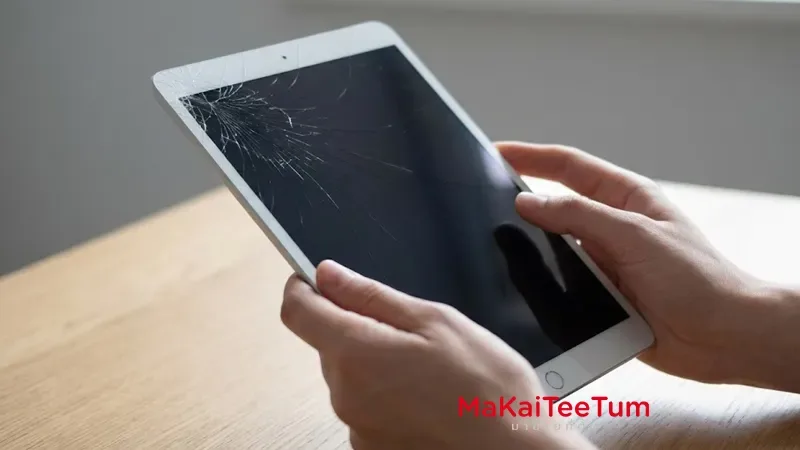
- Screen: Look for any scratches, cracks, dead or bright pixels, display discoloration, or issues with touch sensitivity. A flawless screen is a major selling point.
- Body: Check for dents, deep scratches, bends, or any signs of liquid damage. Even minor cosmetic imperfections can reduce the price.
- Ports: Inspect the charging port and headphone jack (if present) for any damage, debris, or loose connections.
A pristine exterior significantly boosts your iPad’s resale value, making it more appealing to potential buyers.
2.3 Test All Internal Hardware & Software Functions
Beyond external aesthetics, the internal functionality is crucial for an accurate valuation:
- Battery Health: If available in Settings, check “Battery Health” for the maximum capacity percentage. Note if the battery drains quickly or exhibits abnormal behavior.
- Cameras: Test both front and rear cameras, including the flash, autofocus, and video recording quality. Take a few sample photos and videos.
- Audio: Play music or a video to check the speakers for clear sound. For iPad Pro models, test all four speakers. Record a voice memo to ensure the microphones are working correctly.
- Buttons: Verify the responsiveness of the Power, Volume, and Home buttons (if applicable). They should click firmly and perform their intended function.
- Connectivity: Test Wi-Fi and Bluetooth for stable connections. If it’s a Wi-Fi + Cellular model, ensure cellular data works and the device recognizes a SIM card.
- Biometrics: Set up and test Touch ID or Face ID to confirm proper functionality.
- Sensors: Test screen rotation by opening an app and rotating the device. Check GPS accuracy using the Maps app and confirm Siri responds to commands.
2.4 Verify iCloud Lock Status and Prepare for Sale
This is a critical step. An iPad with an active iCloud lock or “Lost/Stolen” status is essentially unusable and holds almost no resale value. To check, go to Settings > [Your Name] > Find My. Before selling, always sign out of your Apple ID, turn off “Find My iPad,” and perform a factory reset (Erase All Content and Settings). This protects your personal data and ensures the device is ready for a new owner.
2.5 Account for Warranty Status and Original Accessories
The remaining Apple warranty or AppleCare+ coverage adds significant value and buyer confidence. Check the warranty status on Apple’s website using your serial number. Furthermore, including original accessories like the box, charger, charging cables, Apple Pencil, or Smart Keyboard can increase the overall value and appeal of your iPad package.
3. How to Research the Market Price for Your Used iPad
3.1 Online Marketplaces
Once you have a clear picture of your iPad’s model, condition, and specifications, it’s time to research market prices. Browse popular online marketplaces such as Kaidee, Shopee, Facebook Marketplace, Ennxo, and Mac2Hand. Look for listings of iPads that match your device’s model, storage, and condition as closely as possible to get a realistic price range.
3.2 Professional Buyback Services & Trade-in Programs
For a reliable and convenient selling experience, compare offers from specialized used Apple device buyers. Consider MaKaiTeeTum (มาขายที่ตั้ม), a leading service known for offering high prices and honest, transparent evaluations for used Apple products. Their professional team inspects devices thoroughly and provides immediate payment, ensuring a safe and fair transaction.
3.3 Tips for Accurate Comparison
When comparing prices, be meticulous. Ensure you’re matching not just the model, but also the storage capacity, connectivity type (Wi-Fi only vs. Wi-Fi + Cellular), and most importantly, the exact physical and functional condition. Differences in accessories, warranty status, and even color can slightly influence the final price.
4. Maximizing Your iPad’s Resale Value: Expert Tips
4.1 Thorough Cleaning
A clean device makes a significantly better first impression. Wipe down the screen and body, ensuring there are no fingerprints, smudges, or dust. Clean out ports carefully. A sparkling iPad suggests it has been well-cared for.
4.2 Data Backup & Factory Reset
Before selling, always back up your important data to iCloud or your computer. Then, perform a factory reset (Settings > General > Transfer or Reset iPad > Erase All Content and Settings) to wipe all personal information. This is essential for your security and ensures a smooth, privacy-protected transaction.
4.3 Optimal Timing for Sale
Timing can influence price. Generally, selling your iPad before new models are launched can secure better prices, as demand for older generations tends to dip once successors are announced.
4.4 Presenting Complete Set
Including all original packaging, chargers, cables, and any other accessories (like an Apple Pencil or Smart Keyboard) can increase the perceived value and justify a higher asking price.
4.5 Transparent Description
Be honest and transparent in your description of the iPad’s condition. Detail any minor flaws, even if they are small. Honesty builds trust with potential buyers and can actually speed up the sale process by setting clear expectations.
5. Understanding iPad Depreciation: What to Expect
5.1 General Trends
Like most electronics, iPads depreciate in value over time, especially with the regular release of new models. The steepest drop usually occurs in the first few years after purchase.
5.2 Estimated Rate
While exact rates vary, you can generally expect:
- Year 1: Approximately 25-30% loss from the original price.
- Year 2: Approximately 45-55% loss from the original price.
- Year 3 onwards: The value may stabilize but typically hovers around 30% or less of its original purchase price.
5.3 Factors Influencing Depreciation
Key factors accelerating depreciation include the launch of new iPad generations, shifts in market demand for specific features, and the overall physical and functional condition of your device.
6. Important Considerations & Precautions for Selling a Used iPad
6.1 For Sellers
Always prioritize data security by performing a factory reset. Arrange to meet buyers in safe, public locations if doing in-person transactions. Confirm payment methods beforehand and ensure funds are cleared before handing over the device.
6.2 For Buyers
If you’re a buyer, thoroughly verify the iPad’s functionality using the steps outlined above. Crucially, confirm there’s no iCloud lock and that the device is reset. Always check the source’s reliability and look for genuine reviews before making a purchase.
7. Frequently Asked Questions (FAQ) About iPad Valuation and Sale
- Q1: How can I tell if my iPad has been repaired or has non-original parts?
A: Look for subtle signs like uneven gaps around the screen, stripped screws, or slight discoloration in the display. Testing camera clarity and button responsiveness can also reveal issues. Always ask the seller for repair history or receipts.
- Q2: Does having AppleCare+ or remaining warranty increase the resale value?
A: Absolutely. Remaining warranty or AppleCare+ significantly increases buyer confidence and can justify a higher resale price, as it offers peace of mind against potential future issues.
- Q3: Are iPads purchased from abroad fully functional in Thailand? (e.g., cellular bands, camera shutter sound).
A: Most core functions will work. However, cellular models might have different band support, potentially affecting 5G/4G connectivity in Thailand. Japanese models, for example, often have an un-mutable camera shutter sound due to local regulations. Always verify model compatibility.
- Q4: What if my iPad has a minor defect (e.g., cracked screen, faulty button)? How does it affect the price?
A: Minor defects will reduce the price, often by more than the cost of repair. A cracked screen can reduce value significantly, while a faulty button might lead to a smaller but still noticeable reduction. Be transparent about such issues to build trust.
8. Conclusion: Confident Selling with MaKaiTeeTum
By following this comprehensive guide, you are now equipped to confidently determine your iPad’s worth, understanding all the factors that influence its market price. Informed self-evaluation is your best tool for a successful sale, ensuring you get the best possible return for your device.
Ready to sell your iPad for a great price? ส่งรุ่นที่ต้องการขายให้ MaKaiTeeTum ประเมินราคาฟรีผ่านเว็บไซต์ หรือ LINE OA: @KunTum – our professional team offers fair, honest evaluations and immediate payment for your used Apple devices. Experience our fast, safe, and professional service today!