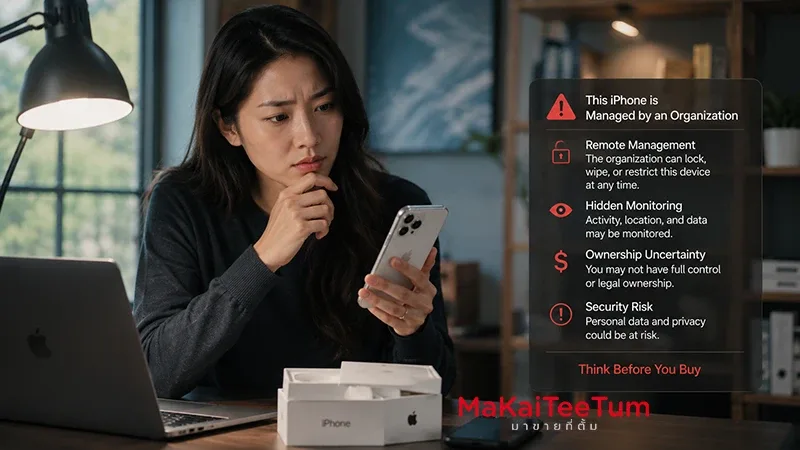
A used iPhone that is priced far below market value can look like a great deal at first. But if the device shows a Remote Management screen, an organization profile, or a message saying the iPhone is managed by a company or school, it may be what many buyers call an MDM-locked iPhone. This is not just a normal software warning. It means the device may still be connected to an organization’s management system.
For second-hand buyers, MDM status matters because it can affect ownership confidence, device restrictions, resale value, and long-term usability. This guide explains what MDM is, how it differs from iCloud lock, whether an MDM-managed iPhone can be used safely, and what to check before buying or selling one.
What Is MDM on an iPhone?
MDM stands for Mobile Device Management. It is a framework that allows organizations to securely configure and manage Apple devices remotely. Businesses, schools, government offices, and IT departments use MDM to deploy settings, install profiles, enforce security policies, manage apps, and control certain device features.
- MDM is commonly used for company-owned or school-owned devices
- Administrators can install configuration profiles and restrictions
- Policies may control Wi-Fi, VPN, apps, passwords, and security settings
- Some devices automatically re-enroll after being erased
- If the device is still assigned to an organization, the seller may not have full control
Apple describes MDM as a secure way for administrators to configure devices using profiles and remote commands. For used iPhone buyers, this means MDM should be treated as a serious ownership and usability signal, not as a minor notification.
MDM Lock vs iCloud Lock: What Is the Difference?
iCloud Lock Is Linked to an Apple ID
iCloud Activation Lock means the iPhone is still connected to the previous owner’s Apple ID. Without the correct credentials or proper removal from the owner’s account, the device cannot be activated normally.
MDM Is Linked to Organizational Management
MDM is different. It is connected to an organization’s device management system, often through Apple Business Manager, Apple School Manager, or a third-party MDM platform. After erasing and activating the device, the iPhone may return to a Remote Management screen and require organization enrollment.
Why Buyers Must Understand Both
A used iPhone can be free from iCloud lock but still be affected by MDM. This is why checking only Apple ID status is not enough when buying second-hand devices.
Can You Use an MDM-Locked iPhone?
Sometimes It Works, But the Risk Is High
Some MDM-managed iPhones may appear usable. They may reach the Home Screen, run apps, make calls, and accept a personal Apple ID. However, if a management profile or automated enrollment remains active, the device can still be subject to restrictions or re-enrollment after reset.
Erasing the iPhone May Not Remove MDM
If the iPhone is assigned to automated device enrollment through an organization, wiping the device may not permanently remove MDM. During setup, the iPhone can contact Apple’s activation servers and display Remote Management again.
It Is Not Ideal as a Main Personal Device
If you plan to use the iPhone for banking, personal photos, work accounts, or sensitive apps, an MDM-managed device is not recommended unless it has been properly released by the organization that owns it.
How to Check If a Used iPhone Has MDM
Check Settings
Go to Settings, General, and VPN & Device Management. If you see a management profile, company name, school name, or configuration profile, ask for a clear explanation before purchasing.
Erase and Activate in Front of the Seller
The safest check is to erase the iPhone and activate it again while the seller is present. If a Remote Management or organization enrollment screen appears during setup, the device should be treated as high risk.
Ask About Device Origin
Be cautious with phones described as former company devices, auction lots, bulk imports, or unusually cheap corporate stock. They may not have been properly released from the original organization.
Do Not Trust “It Will Disappear After Reset”
Some profiles can be removed manually, but automated enrollment may return after an erase. Real verification requires a full reset and activation test.
Why MDM Reduces Used iPhone Resale Value
An MDM-managed iPhone carries uncertainty. Buyers do not know whether the device will remain usable, become restricted, or require organization enrollment after a future reset.
- Ownership status may be unclear
- Remote Management can return after erasing the device
- Some features may be restricted by organization policy
- Resale demand is much lower than normal devices
- Professional buyback stores may reduce pricing significantly or reject the device
Even if the hardware is in excellent condition, MDM status can reduce second-hand market pricing because the risk is tied to management control, not cosmetic quality.
Should You Buy an MDM-Locked iPhone?
Not Recommended for General Users
If you need a reliable personal iPhone, buying an MDM-managed device is usually not worth the savings. The lower price may be offset by future activation problems, restrictions, or poor resale value.
Only Consider It If You Understand the Risk
Some users may buy such devices for testing, parts, or limited non-sensitive use. But this should be done with full awareness that the device may have restrictions and lower resale value.
If the Seller Can Remove It, Verify Before Paying
If the seller claims the MDM can be removed, request proper release before payment. Then erase, reactivate, sign in with your Apple ID, and confirm that Remote Management does not return.
What Should You Do If You Already Own One?
Contact the Original Organization
The proper solution is for the organization that owns or manages the device to release it from their MDM or Apple Business Manager account. If the phone is legitimately yours, prepare proof of purchase or transfer documentation.
Avoid Unreliable Bypass Services
Services promising permanent MDM removal at very low prices may only provide temporary bypasses. The issue can return after updates or resets if the device remains assigned to the original organization.
Get a Realistic Price Estimate
If the iPhone still works but remains MDM-managed, its value should be evaluated differently from a normal unlocked iPhone. Model, storage, condition, battery, display, and management status all matter.
Should You Keep It or Sell It?
Keep It If:
- You only use it as a backup device
- You do not store sensitive data on it
- You understand the risk of MDM returning after reset
- You do not expect strong future resale value
Sell or Get an Estimate If:
- You want a normal device with lower long-term risk
- The iPhone is still physically in good condition
- You do not want to use important accounts on it
- You are planning to upgrade and want to understand real resale value
Using an MDM-managed iPhone may feel cheaper in the short term, but the long-term risk can outweigh the initial savings if the device becomes restricted or difficult to resell.
Why You Should Check Value Before Selling an MDM-Suspected iPhone
An iPhone with possible MDM cannot be priced like a normal second-hand device. Professional evaluation should consider model, storage, battery, display, camera, iCloud status, management profile, and overall usability.
MaKaiTeeTum provides Apple device buyback and evaluation services for iPhone, iPad, MacBook, iMac, and Apple Watch. It is useful for sellers who want to understand real market value before listing a device independently.
- Fast inspection in around 10 minutes
- Pricing based on model, condition, and device risk factors
- Pickup service available in supported areas
- Immediate payment after agreement
- Privacy-focused handling with no personal data retention
Quick Decision Summary
- MDM is organizational device management, not the same as iCloud lock
- An MDM-managed iPhone may work temporarily but remains risky
- Remote Management during setup is a major warning sign
- Erasing the iPhone does not always remove MDM
- MDM status can significantly reduce resale value
- It is not recommended as a main personal device
- The seller should properly release the device before payment
- If you already own one, get a realistic value estimate before selling
If you have an iPhone that may be MDM-managed or you want to check its resale value before selling, you can send the model, storage, and condition for an initial estimate through LINE: @KunTum, visit makaiteetum.com, or call 08-1154-5496.
References
https://support.apple.com/guide/deployment/intro-to-device-management-profiles-depc0aadd3fe/web
https://support.apple.com/id-id/guide/deployment-education/edu1c1be3511/web
https://support.apple.com/guide/deployment/review-device-management-restrictions-dep739685973/web
https://support.apple.com/guide/deployment/restrictions-for-supervised-devices-dep6b5ae23e9/web
https://support.apple.com/id-id/guide/apple-configurator-mac/apd7a57d9560/mac