eSIM has rapidly become the future of mobile connectivity. What started as an alternative to the traditional plastic SIM card is now becoming Apple’s preferred technology, with some iPhone models sold in certain markets relying entirely on eSIM.
If you’re planning to upgrade your iPhone, travel internationally, or simply want the convenience of managing multiple phone numbers, understanding how eSIM works is more important than ever.
This guide explains everything you need to know—from how eSIM differs from a physical SIM card to transferring eSIM between iPhones, supported models, dual SIM capabilities, and how eSIM may influence the resale value of your device.
What Is an eSIM?
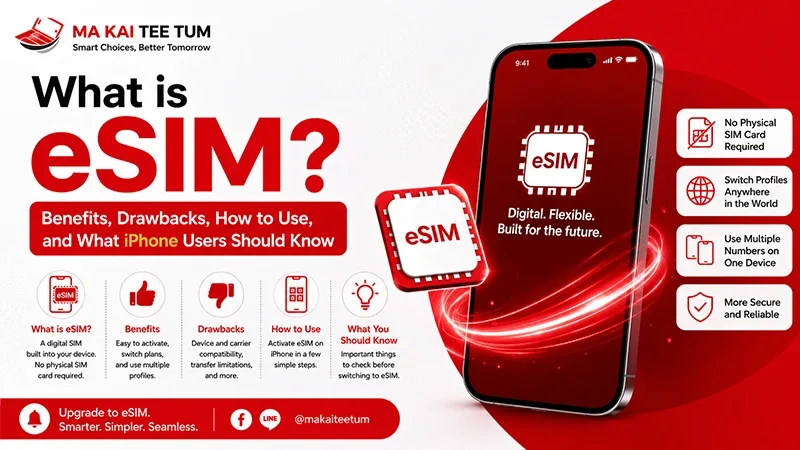
eSIM stands for Embedded Subscriber Identity Module. Unlike a traditional Nano-SIM, an eSIM is built directly into your iPhone’s hardware. Instead of inserting a physical SIM card, you activate your mobile plan digitally through your carrier.
Activation usually takes only a few minutes and can be completed by scanning a QR code, downloading a carrier profile, or using automatic carrier activation.
- No physical SIM card required
- Activate a mobile plan digitally
- Store multiple carrier profiles
- Ideal for international travel and business users
- Less risk of losing or damaging a SIM card
For most users, the transition feels almost invisible because eSIM functions exactly like a traditional SIM after activation.
eSIM vs Physical SIM: What’s the Difference?
Both technologies connect your iPhone to your mobile carrier, but they differ significantly in convenience and flexibility.
Advantages of eSIM
- No SIM tray removal
- Digital activation
- Faster carrier switching
- Better support for multiple phone numbers
- Convenient when traveling abroad
Advantages of Physical SIM
- Easy to swap between different devices
- Supported by virtually every mobile carrier
- Simple troubleshooting if changing phones frequently
For most iPhone owners, eSIM offers greater long-term convenience, while physical SIM cards remain useful for users who regularly move their number between different phones.
Benefits of Using eSIM
Quick Carrier Activation
Many carriers allow customers to activate an eSIM remotely without visiting a physical store, making the entire setup process significantly faster.
Multiple Numbers on One Device
Business users often keep separate work and personal numbers on the same iPhone without carrying two devices.
Perfect for International Travel
Instead of purchasing a local physical SIM card after landing, travelers can install an international eSIM plan before departure and connect immediately upon arrival.
Improved Device Design
Removing the need for a physical SIM tray gives manufacturers more flexibility for internal hardware design while reducing potential points of water and dust entry.
Potential Drawbacks of eSIM
Although eSIM offers many advantages, it isn’t perfect for every situation.
- Some carriers still require identity verification before transferring an eSIM.
- Not every mobile operator supports eSIM services.
- Moving your number to another phone may require carrier approval.
- Troubleshooting can occasionally be more complex than replacing a physical SIM.
Fortunately, support continues to improve worldwide, and major carriers in many countries now offer streamlined eSIM activation and transfer processes.
How to Transfer an eSIM to a New iPhone
Apple has simplified eSIM transfers considerably. If both iPhones support eSIM transfer and your carrier participates, the migration process can often be completed in just a few minutes.
Basic Transfer Steps
- Update both iPhones to the latest iOS version.
- Enable Bluetooth on both devices.
- Open Settings → Cellular → Add eSIM.
- Select Transfer From Nearby iPhone if available.
- Approve the transfer on your previous iPhone.
If automatic transfer isn’t available, your carrier may provide a new QR code or require account verification before activating your existing number on the new device.
How Many eSIMs Can an iPhone Support?
One of the biggest misconceptions about eSIM is that an iPhone can only have one digital SIM. In reality, modern iPhones can store multiple eSIM profiles, allowing users to switch between carriers or phone numbers whenever needed.
While the exact storage capacity varies by model, most recent iPhones can keep several eSIM profiles and actively use up to two phone numbers simultaneously.
- One Nano-SIM + One eSIM (supported models)
- Two active eSIMs on newer compatible models
- Store multiple eSIM profiles for future use
- Choose separate numbers for calls, messages, and mobile data
This flexibility makes eSIM particularly attractive for professionals, frequent travelers, and users who want separate personal and business phone numbers without carrying two devices.
Which iPhone Models Support eSIM?
Apple first introduced eSIM support with the iPhone XS generation and has expanded support across every flagship iPhone since then.
Compatible Models
- iPhone XS
- iPhone XS Max
- iPhone XR
- iPhone 11 Series
- iPhone SE (2nd generation and newer)
- iPhone 12 Series
- iPhone 13 Series
- iPhone 14 Series
- iPhone 15 Series
- iPhone 16 Series and newer
It’s also important to know that certain iPhone models sold in the United States no longer include a physical SIM tray. These devices rely exclusively on eSIM technology, so buyers importing iPhones should verify regional model specifications before purchasing.
Should You Remove Your eSIM Before Selling an iPhone?
Yes.
Before selling or trading in your iPhone, removing your mobile plan is just as important as erasing your personal data. Although eSIM is digital, your carrier profile remains associated with the device until it is properly removed.
Recommended Checklist Before Selling
- Sign out of your Apple Account.
- Turn off Find My iPhone.
- Remove your eSIM or cellular plan if required by your carrier.
- Erase all content and settings.
- Confirm the device returns to the initial setup screen.
Following these steps protects your privacy while allowing the next owner to activate the device without unnecessary delays.
Does eSIM Affect iPhone Resale Value?
eSIM itself doesn’t directly increase or decrease an iPhone’s resale price. However, as more mobile carriers transition toward digital SIM technology, devices with full eSIM support are expected to remain attractive for a longer period.
Today’s resale market still values overall device condition more than connectivity technology, but long-term buying trends increasingly favor newer models with modern wireless capabilities.
Factors That Influence Resale Value More Than eSIM
- Overall cosmetic condition
- Battery Health percentage
- Storage capacity
- Original accessories
- Activation Lock status
- Carrier unlock status
If you’re planning to upgrade to a newer iPhone, checking your current device’s market value before a major Apple launch often helps maximize your return.
When Is the Best Time to Sell Your Current iPhone?
Most iPhone resale prices begin softening shortly before or immediately after Apple’s annual product announcement. As thousands of users list their existing devices for sale simultaneously, supply increases and resale offers naturally become more competitive.
Checking your iPhone’s value before launch season gives you a clearer picture of your upgrade budget and may help you avoid unnecessary depreciation.
Quick Decision Guide
- eSIM is the future and is already widely supported by modern iPhones.
- Most recent iPhones can actively use two phone numbers at the same time.
- eSIM transfer between iPhones is becoming easier as more carriers support Apple’s migration tools.
- Always remove your eSIM and sign out of your Apple Account before selling your device.
- If you’re planning an upgrade, checking your resale value before Apple’s next iPhone launch can help reduce your overall upgrade cost.
Know Your iPhone’s Value Before You Upgrade
If you’re upgrading to a newer iPhone with expanded eSIM capabilities, understanding your current device’s resale value is one of the smartest financial decisions you can make.
MaKaiTeeTum specializes in purchasing pre-owned Apple devices, including iPhone, iPad, MacBook, iMac, and Apple Watch. Simply provide your model, storage capacity, and device condition to receive a fast estimate. Most evaluations are completed within approximately 10 minutes, with immediate payment, secure data handling, and convenient pickup services available.
LINE:
@KunTum
Phone:
+66 81 154 5496
Website:
makaiteetum.com
References
Apple Support – Use eSIM on iPhone
Apple Support – Transfer an eSIM to a New iPhone
Apple Support – Using Dual SIM with an eSIM
Apple – iPhone
Apple Support