For decades, passwords have been the foundation of online security. Unfortunately, they have also become one of its biggest weaknesses. Weak passwords, password reuse, phishing attacks, and massive data breaches continue to compromise millions of online accounts every year.
To solve these problems, Apple, Google, Microsoft, and the FIDO Alliance have introduced Passkeys—a new authentication method designed to eliminate traditional passwords while making online accounts significantly more secure.
If you’ve recently seen websites asking you to “Sign in with a Passkey,” you’re looking at what many security experts consider the future of authentication. This guide explains how Passkeys work, why Apple is investing heavily in them, and whether you should start using them today.
What Is a Passkey?
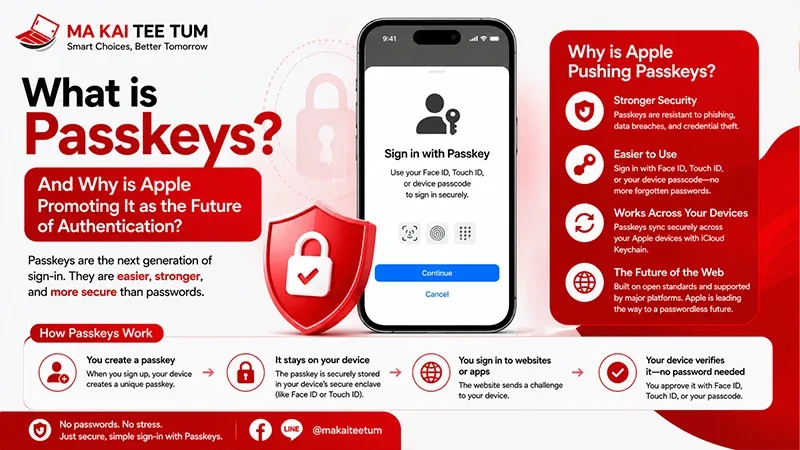
A Passkey is a passwordless authentication credential based on public key cryptography. Instead of creating and remembering a password, your device generates a pair of cryptographic keys.
- A public key is stored by the website or service.
- A private key remains securely stored on your device.
Because the private key never leaves your iPhone, iPad, or Mac, there is no password for attackers to steal—even if the service itself experiences a security breach.
How Are Passkeys Different from Passwords?
The biggest difference is simple: you no longer need to remember, type, or manage passwords.
Traditional Passwords
- Must be created and remembered.
- Often reused across multiple websites.
- Can be stolen through phishing.
- May be exposed during database breaches.
Passkeys
- No passwords to memorize.
- Authenticate using Face ID, Touch ID, or device authentication.
- Strong protection against phishing attacks.
- No reusable secret stored on remote servers.
This fundamental difference removes many of the weaknesses that have existed since passwords first became the standard for online authentication.
How Do Passkeys Work?
Key Pair Generation
When you create a Passkey, your device automatically generates a unique cryptographic key pair.
Biometric Authentication
Whenever you sign in, Face ID, Touch ID, or your device passcode verifies your identity locally. The private key never leaves your device during this process.
Secure Verification
The website verifies your identity using the matching public key, allowing authentication without ever transmitting a traditional password across the internet.
This approach dramatically reduces opportunities for attackers to intercept login credentials.
Why Is Apple Pushing Passkeys?
Apple believes passwords have become one of the weakest links in digital security. Many account compromises happen because users choose weak passwords, reuse them across multiple websites, or unknowingly enter them into fraudulent websites.
Passkeys solve these problems by eliminating passwords entirely.
- No password databases to steal.
- Strong resistance against phishing attacks.
- Faster authentication.
- Simpler user experience.
- Better privacy through device-based authentication.
Apple isn’t working alone. Passkeys are based on open standards developed jointly by Apple, Google, Microsoft, and the FIDO Alliance, making passwordless authentication available across multiple platforms and ecosystems.
Are Passkeys Really More Secure?
In most situations, yes.
Unlike passwords, Passkeys don’t rely on information that users must remember or manually enter. Because there is no reusable secret shared with websites, many of today’s most common attack methods become ineffective.
Even if a company’s servers are compromised, attackers cannot simply download your password and reuse it elsewhere because no password exists in the traditional sense.
- Protection against phishing.
- No password reuse.
- No password leaks.
- Biometric authentication for every login.
- Industry-standard public key cryptography.
“`html id=”passkeys-en-part2″
Which Websites and Apps Support Passkeys?
Passkey adoption is growing rapidly across the technology industry. Many of the world’s largest platforms already support passwordless sign-in, and the list continues to expand.
Popular services that currently support Passkeys include:
- Apple Account
- Google Account
- Microsoft Account
- GitHub
- PayPal
- Nintendo Account
- Adobe
- Shopify and many modern web services
Because Passkeys are based on open FIDO standards rather than Apple’s own proprietary technology, they work across multiple operating systems and devices when supported by the service.
What Happens If You Buy a New iPhone?
For Apple users, migrating Passkeys is usually effortless.
If iCloud Keychain is enabled and you sign in with the same Apple Account, your Passkeys are securely synchronized across your iPhone, iPad, and Mac using end-to-end encryption.
That means you don’t need to recreate every Passkey when upgrading to a new iPhone. After restoring your account, supported websites can continue using the same Passkeys almost immediately.
Should You Start Using Passkeys Now?
Yes—whenever a website or app supports them.
Passkeys aren’t intended to replace every password overnight. During the transition period, you’ll likely use a combination of passwords, Passkeys, and two-factor authentication depending on which services you access.
However, for supported accounts, Passkeys offer a safer and more convenient login experience than traditional passwords.
- No passwords to remember.
- Faster sign-in.
- Much stronger phishing protection.
- Simple synchronization across Apple devices.
For services that don’t yet support Passkeys, continue using strong unique passwords together with two-factor authentication whenever possible.
Do Passkeys Affect iPhone Resale Value?
Not directly—but they highlight an important step before selling any Apple device.
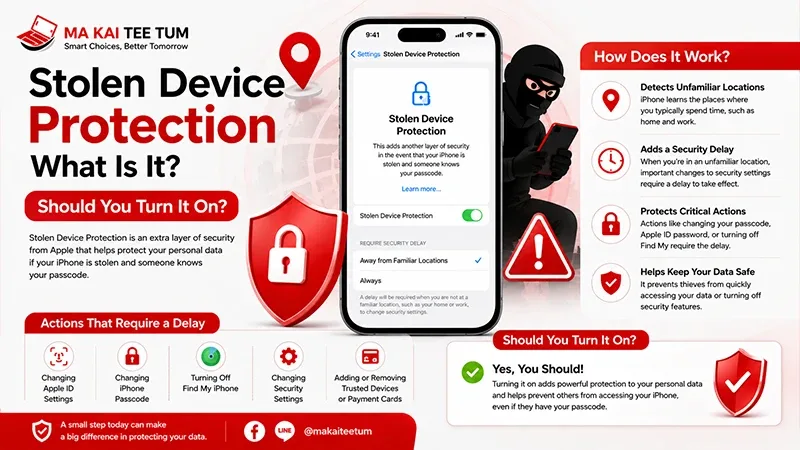
Because Passkeys are securely stored in iCloud Keychain rather than permanently inside the iPhone itself, properly signing out of your Apple Account and erasing the device ensures the next owner receives a clean device while your authentication credentials remain protected.
Before selling your iPhone, always:
- Sign out of your Apple Account.
- Turn off Find My.
- Erase all content and settings.
- Verify Activation Lock has been removed.
Following Apple’s recommended reset procedure protects both your personal information and the resale value of your device.
Quick Decision Guide
- Passkeys are designed to replace traditional passwords.
- Authentication relies on Face ID, Touch ID, or device verification instead of typed passwords.
- Passkeys provide significantly better protection against phishing attacks.
- They synchronize securely through iCloud Keychain across Apple devices.
- Whenever a website supports Passkeys, they are generally the recommended authentication method.
- Before selling your iPhone, remove your Apple Account and erase the device properly to protect your credentials.
Know Your iPhone’s Value Before You Upgrade
If you’re upgrading to a newer iPhone with Apple’s latest security technologies, understanding the resale value of your current device can help reduce the overall cost of upgrading.
MaKaiTeeTum specializes in purchasing pre-owned Apple devices, including iPhone, iPad, MacBook, iMac, and Apple Watch. Simply provide your model, storage capacity, and overall condition to receive a fast valuation. Most estimates are completed within approximately 10 minutes, with immediate payment, secure data handling, and convenient pickup services.
LINE:
@KunTum
Phone:
+66 81 154 5496
Website:
makaiteetum.com
References
Apple Support – Passkeys on iPhone
FIDO Alliance – Passkeys
Apple Developer – Passkeys
Apple Support
Apple – Privacy