Most people assume their iCloud data is already completely private. While Apple has long encrypted customer information, not every type of iCloud data was originally protected with end-to-end encryption.
To strengthen user privacy even further, Apple introduced Advanced Data Protection (ADP), an optional security feature that dramatically expands end-to-end encryption across iCloud.
Once enabled, the encryption keys protecting most of your iCloud data are controlled only by your trusted Apple devices. Even Apple cannot decrypt or access that information.
This guide explains how Advanced Data Protection works, what it protects, who should enable it, and what responsibilities come with using Apple’s strongest cloud security option.
What Is Advanced Data Protection?
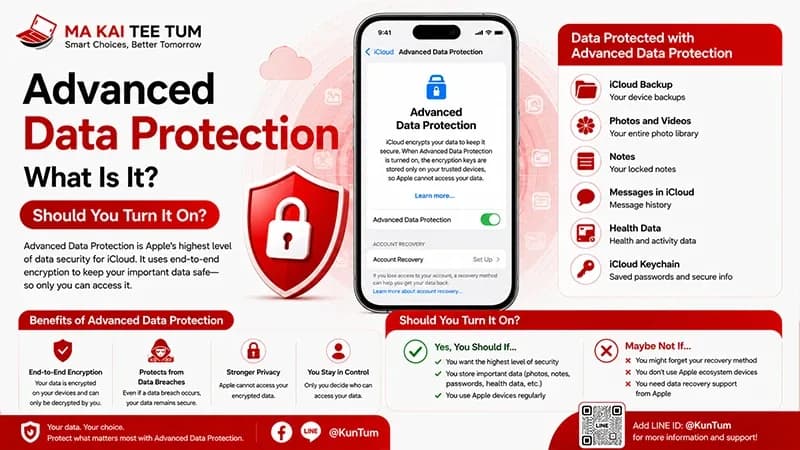
Advanced Data Protection is Apple’s highest level of cloud security for iCloud. It extends end-to-end encryption to many additional categories of iCloud data, ensuring that only the account owner can decrypt the protected information.
Unlike standard cloud encryption—where the service provider may retain recovery capabilities—Advanced Data Protection shifts encryption control entirely to the user.
- More iCloud data becomes end-to-end encrypted.
- Apple cannot access protected content.
- Encryption keys remain on trusted devices.
- Significantly stronger protection against cloud data breaches.
What Is End-to-End Encryption?
End-to-end encryption means information is encrypted before leaving your device and can only be decrypted on another trusted device that belongs to you.
Even while your data is stored on Apple’s servers, it remains unreadable without your personal encryption keys.
This approach dramatically improves privacy because neither Apple nor anyone intercepting cloud traffic can view your protected information.
What Data Does Advanced Data Protection Protect?
When enabled, Advanced Data Protection extends end-to-end encryption to many of the most sensitive categories stored in iCloud.
- iCloud Backup
- iCloud Drive
- Photos
- Notes
- Voice Memos
- Safari Bookmarks
- Messages backups
- Wallet Passes
- Reminders
Some services—including Mail, Contacts, and Calendar—continue using different encryption models because they must remain compatible with widely adopted internet standards.
How Does Advanced Data Protection Work?
Your Devices Hold the Encryption Keys
Once Advanced Data Protection is enabled, trusted Apple devices become responsible for holding the cryptographic keys required to decrypt your protected iCloud content.
Apple Cannot Recover Your Protected Data
Unlike the standard iCloud security model, Apple no longer maintains recovery access for the protected categories covered by Advanced Data Protection.
Recovery Becomes Your Responsibility
Because Apple cannot decrypt your protected data, you’ll be required to configure either a Recovery Contact or a Recovery Key before enabling the feature.
This recovery method ensures that you can still regain access to your account if every trusted Apple device becomes unavailable.
Who Should Enable Advanced Data Protection?
Although anyone can benefit from stronger privacy, Advanced Data Protection is especially valuable for users who store sensitive information inside iCloud.
- Business professionals.
- Journalists.
- Content creators.
- Developers.
- Users storing important documents or personal photos.
- Anyone who prioritizes digital privacy.
For these users, preventing unauthorized access to cloud backups may be just as important as protecting the iPhone itself.
“`html id=”adp-en-part2″
Should You Enable Advanced Data Protection?
For most privacy-conscious users, the answer is yes.
Advanced Data Protection provides Apple’s strongest level of cloud security by ensuring that you—not Apple—control the encryption keys for most of your iCloud data.
However, stronger security also means greater personal responsibility. If you lose access to all of your trusted devices and haven’t properly configured your recovery options, Apple cannot restore your encrypted data.
- Excellent for users who value privacy.
- Ideal for protecting cloud backups and personal files.
- Recommended for users storing sensitive information.
- Requires careful account recovery planning.
Potential Drawbacks
The biggest limitation isn’t the technology—it’s recovery.
Because Apple no longer stores the decryption keys for protected data, losing every trusted device without a valid Recovery Contact or Recovery Key could permanently lock you out of your encrypted information.
Before enabling Advanced Data Protection, you should:
- Configure a trusted Recovery Contact.
- Or securely store a Recovery Key.
- Verify all Apple devices are updated.
- Review your Apple Account recovery settings.
For users who frequently forget passwords or change devices without proper backups, understanding the recovery process is just as important as enabling the feature itself.
How to Enable Advanced Data Protection
After updating all devices associated with your Apple Account, enabling Advanced Data Protection takes only a few minutes.
- Open Settings.
- Tap your Apple Account.
- Select iCloud.
- Open Advanced Data Protection.
- Set up a Recovery Contact or Recovery Key if prompted.
- Confirm activation.
Apple verifies that every trusted device linked to your account supports Advanced Data Protection before allowing the feature to be enabled.
Does Advanced Data Protection Affect iPhone Resale Value?
Not directly, but it reinforces good security practices before selling an Apple device.
Advanced Data Protection protects your iCloud data—not the hardware itself. Before selling your iPhone, you should always complete Apple’s recommended reset procedure.
- Sign out of your Apple Account.
- Turn off Find My.
- Erase all content and settings.
- Confirm Activation Lock has been removed.
Following these steps protects your personal information while allowing the new owner to activate the device without unnecessary complications.
Quick Decision Guide
- Advanced Data Protection offers Apple’s highest level of iCloud security.
- Most encrypted data becomes accessible only by your trusted devices.
- Apple cannot decrypt your protected information.
- Recovery planning is essential before enabling the feature.
- Users who prioritize privacy should strongly consider turning it on.
- Before selling your iPhone, always remove your Apple Account and erase the device correctly.
Know Your iPhone’s Value Before You Upgrade
If you’re planning to upgrade to a newer iPhone with Apple’s latest privacy and security features, understanding your current device’s resale value can help reduce your overall upgrade cost.
MaKaiTeeTum purchases pre-owned Apple devices, including iPhone, iPad, MacBook, iMac, and Apple Watch. Simply send your model, storage capacity, and overall condition for a fast valuation. Most estimates are completed within approximately 10 minutes, with secure data handling, immediate payment, and convenient pickup services.
LINE:
@KunTum
Phone:
+66 81 154 5496
Website:
makaiteetum.com
References
Apple Support – Advanced Data Protection for iCloud
Apple Platform Security Guide
Apple – Privacy
Apple Support
Apple User Guide – iPhone