If you own an iPhone Pro, you’ve probably noticed camera options such as HEIF, JPEG, and Apple ProRAW. While they all capture photos, they are designed for completely different purposes.
Some users leave Apple ProRAW enabled all the time because they assume bigger files always mean better photos. Others stick with HEIF to save storage space but wonder whether they’re sacrificing image quality.
The reality is that neither format is universally better. The right choice depends on how you shoot, how much editing you plan to do, and how important storage efficiency is for your workflow.
This guide explains the real differences between HEIF and Apple ProRAW, including image quality, editing flexibility, storage requirements, cloud backups, and which format makes the most sense for different types of iPhone users.
What Is HEIF?
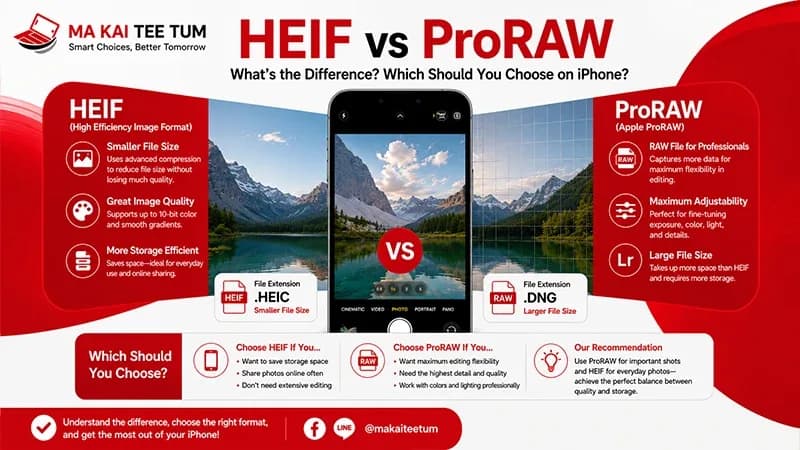
HEIF (High Efficiency Image Format) is Apple’s default image format for most iPhone photos. Files are typically saved with the .HEIC extension and use modern compression technology to preserve excellent image quality while consuming significantly less storage than JPEG.
Rather than focusing solely on file size, HEIF is designed to provide an efficient balance between quality, speed, and storage capacity.
- Smaller file sizes
- Excellent image quality
- More efficient than JPEG
- Ideal for everyday photography
- Optimized for iCloud Photos and Apple devices
For the vast majority of iPhone users, HEIF delivers more than enough quality for sharing, printing, and preserving everyday memories.
What Is Apple ProRAW?
Apple ProRAW is Apple’s professional RAW image format available on supported iPhone Pro models. Unlike traditional RAW files, Apple ProRAW combines computational photography with RAW sensor data, giving photographers far greater editing flexibility without losing the benefits of Apple’s image processing.
Images captured in Apple ProRAW retain substantially more information, allowing photographers to recover highlights, brighten shadows, adjust white balance, and fine-tune colors with minimal quality loss.
- Greater editing flexibility
- Higher dynamic range recovery
- Improved highlight and shadow adjustments
- Better white balance correction
- Much larger file sizes
HEIF vs Apple ProRAW: The Biggest Differences
Image Processing
HEIF photos are fully processed and optimized by the iPhone before being saved. They are ready to share immediately with little or no editing required.
Apple ProRAW retains significantly more image information, allowing photographers to make extensive adjustments during post-processing without degrading image quality.
File Size
The difference in storage requirements is dramatic.
- Typical HEIF photo: approximately 2–5 MB
- Typical Apple ProRAW photo: 25–75 MB or more
- 48 MP ProRAW files can exceed 75 MB depending on scene complexity
Photographers who frequently use ProRAW should expect their storage and iCloud usage to grow much faster than users who primarily shoot in HEIF.
Editing Potential
If your workflow includes Lightroom, Adobe Camera Raw, Photoshop, Capture One, or other professional editing software, Apple ProRAW offers considerably more creative control than HEIF.
If you rarely edit your photos beyond simple cropping or filters, HEIF remains the more practical choice.
When Should You Use HEIF?
HEIF is designed for everyday photography and is the format Apple expects most users to rely on.
- Family photos
- Travel photography
- Social media content
- School or work documentation
- Daily snapshots
Because HEIF files are much smaller, they save valuable storage space on your iPhone while also reducing iCloud storage consumption and backup times.
When Should You Use Apple ProRAW?
Apple ProRAW shines when image quality matters more than storage efficiency.
Professional photographers, content creators, designers, and anyone planning significant post-processing will benefit from the additional image data stored inside every ProRAW file.
- Landscape photography
- Commercial product photography
- Portrait editing
- Night photography
- Professional content creation
- Large-format printing
Rather than leaving ProRAW enabled permanently, many experienced photographers activate it only for important scenes where maximum editing flexibility will genuinely make a difference.
How Much Storage Does Apple ProRAW Use?
The biggest trade-off when shooting in Apple ProRAW is storage consumption.
While a typical HEIF image usually occupies between 2 MB and 5 MB, a single 48-megapixel Apple ProRAW photo can easily exceed 75 MB depending on lighting conditions and scene complexity.
Storage Comparison
- 100 HEIF photos: approximately 300–500 MB
- 100 Apple ProRAW photos: approximately 5–8 GB
- 500 ProRAW photos: often exceed 30 GB
For users with a 128 GB iPhone, leaving ProRAW enabled all day can quickly consume available storage, especially during vacations or professional photo sessions.
Does Apple ProRAW Affect iCloud Storage?
Yes.
If iCloud Photos is enabled, every Apple ProRAW image is uploaded in its original size. Because ProRAW files are significantly larger than HEIF, photographers who shoot exclusively in RAW often upgrade their iCloud storage plans sooner than casual users.
For professionals, the additional cloud storage cost may be worthwhile because of the editing flexibility ProRAW provides. For everyday users, HEIF usually offers a much better balance between image quality and storage efficiency.
Should You Leave Apple ProRAW Enabled All the Time?
Generally, no.
Although Apple ProRAW produces exceptional image quality, using it for every photo creates unnecessary storage demands while increasing backup times and iCloud usage.
A more practical workflow is:
- Use HEIF for everyday photography.
- Switch to Apple ProRAW for important shots.
- Capture ProRAW only when you intend to edit the image afterward.
This approach delivers professional image quality when needed while keeping storage usage under control.
Does Shooting ProRAW Affect iPhone Resale Value?
Not directly—but it can influence how buyers evaluate the device.
Professional photographers purchasing a used iPhone Pro often verify that every camera functions correctly, including Apple ProRAW support. A device with camera-related hardware warnings or non-genuine replacement parts may lose buyer confidence.
What Buyers Usually Check
- All camera lenses function correctly.
- Apple ProRAW is available and operational.
- No camera-related service warnings.
- No visible lens damage.
- Original camera hardware remains intact.
More importantly, a well-maintained iPhone with healthy battery life, excellent cosmetic condition, and fully functional cameras typically retains its value better than one requiring repairs.
Quick Decision Guide
- Choose HEIF for everyday photography, social media, travel, and family photos.
- Choose Apple ProRAW when you plan to edit your images professionally.
- HEIF saves significant storage space without sacrificing noticeable quality for most users.
- Apple ProRAW provides maximum editing flexibility but requires considerably more storage.
- There’s no need to leave ProRAW enabled permanently—switch it on only when the scene truly benefits from it.
- If you’re planning to sell your iPhone later, maintaining fully functional camera hardware helps preserve resale value.
Know Your iPhone’s Value Before You Upgrade
If you’re considering upgrading to a newer iPhone Pro with improved camera technology, checking your current iPhone’s resale value before making a purchase can significantly reduce your upgrade cost.
MaKaiTeeTum purchases pre-owned Apple devices including iPhone, iPad, MacBook, iMac, and Apple Watch. Simply provide your model, storage capacity, and overall condition for a fast valuation. Most quotes are completed within approximately 10 minutes, with immediate payment, secure data handling, and convenient pickup services.
LINE:
@KunTum
Phone:
+66 81 154 5496
Website:
makaiteetum.com
References
Apple Support – Apple ProRAW
Apple Support – Camera Formats
Apple Developer – Choosing a Photo Format
Apple – iPhone
Apple Support