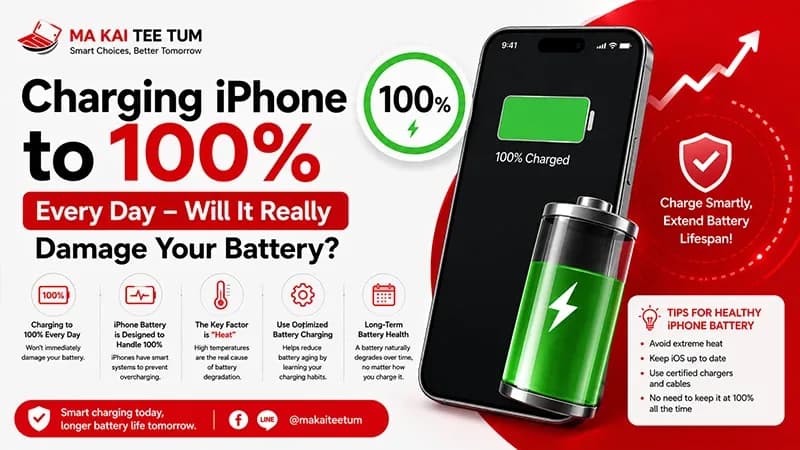
One of the most common questions among iPhone users is whether charging to 100% every day will shorten battery life. Some people unplug their phones at exactly 80%, while others leave them charging overnight without giving it a second thought.
The truth is more nuanced. Modern iPhones are equipped with intelligent battery management systems designed to reduce long-term battery aging. Features such as Optimized Battery Charging and Charging Limit work behind the scenes to balance battery longevity with everyday convenience.
This guide explains how lithium-ion batteries actually age, whether charging to 100% is harmful, how Apple’s battery optimization features work, and what battery health means for both daily performance and your iPhone’s resale value.
Does Charging to 100% Really Damage Your Battery?
Not by itself.
Charging an iPhone to 100% is completely normal and fully supported by Apple. Your iPhone is designed to safely reach full capacity without causing immediate battery damage.
What matters more is how long the battery remains at full charge and the temperature during charging. Lithium-ion batteries experience more stress when kept at very high charge levels for extended periods, especially in warm environments.
- Charging to 100% is safe.
- Heat is a much bigger concern than reaching full charge.
- Keeping the battery at 100% for many hours every day may accelerate long-term aging.
- Apple’s battery management software helps minimize this effect automatically.
What Is Optimized Battery Charging?
Optimized Battery Charging is an intelligent feature built into iOS that reduces battery aging by learning your daily charging routine.
For example, if you typically charge your iPhone overnight and unplug it around 7:00 AM, your iPhone may pause charging at approximately 80% before completing the remaining 20% shortly before you usually wake up.
This reduces the amount of time your battery spends sitting at full capacity, which helps preserve long-term battery health without affecting your daily experience.
How Optimized Battery Charging Works
Learning Your Routine
Your iPhone uses on-device machine learning to recognize recurring charging habits, including where and when you typically charge your phone.
Pausing Around 80%
Once your battery reaches approximately 80%, charging temporarily pauses instead of immediately continuing to 100%.
Completing the Final Charge
Shortly before your expected unplugging time, charging automatically resumes and finishes at 100%, ensuring your iPhone is fully charged when you need it.
Everything happens automatically without requiring any manual intervention from the user.
What Is Charging Limit?
Newer iPhone models introduce another battery protection feature called Charging Limit. Instead of always charging to 100%, users can manually choose a maximum charging level such as 80%, 85%, 90%, or 95%.
This feature is especially useful for people who spend most of the day near a charger and don’t need maximum battery capacity every morning.
Reducing the maximum charge level slightly can decrease battery stress over time, potentially slowing long-term capacity loss.
What Actually Causes iPhone Batteries to Wear Out?
Battery aging is influenced by several factors, and many users focus on the wrong one. Charging to 100% is only a small part of the overall picture.
Heat
High temperatures remain the biggest enemy of lithium-ion batteries. Gaming, recording 4K video, fast charging in hot environments, or leaving an iPhone inside a parked car can all accelerate battery degradation.
Charge Cycles
Every lithium-ion battery has a limited number of complete charge cycles. One cycle represents using a total of 100% battery capacity, not necessarily charging from 0% to 100% in a single session.
Extreme Charge Levels
Keeping a battery completely full or completely empty for long periods creates additional chemical stress. This is why Apple’s battery management system focuses on reducing unnecessary time spent at maximum charge.
“`html id=”battery-en-part2″
Should You Charge to 80% or 100%?
There isn’t a single answer that fits everyone. The ideal charging habit depends on how you use your iPhone each day.
Charging to 80% Makes Sense If You:
- Work near a charger throughout the day.
- Rarely drain your battery completely.
- Plan to keep your iPhone for several years.
- Want to maximize long-term battery longevity.
Charging to 100% Makes Sense If You:
- Travel frequently.
- Spend long hours away from a power source.
- Use navigation, photography, or video recording extensively.
- Need the longest possible battery life every day.
For most users, enabling Optimized Battery Charging—or Charging Limit on supported models—is more important than obsessing over a specific battery percentage.
Is It Safe to Charge Your iPhone Overnight?
Yes.
Modern iPhones automatically regulate charging once the battery reaches full capacity. When Optimized Battery Charging is enabled, iOS may intentionally delay the final portion of the charge until shortly before you normally unplug your phone.
The greater concern is heat, not overnight charging itself. Charging your iPhone under a pillow, on a soft mattress, or inside a hot vehicle traps heat and may accelerate battery aging over time.
Does Fast Charging Damage the Battery?
Not under normal conditions.
Apple designs iPhone hardware and software to safely manage fast charging. The charging speed automatically slows as the battery fills, helping reduce stress on the battery cells.
However, combining fast charging with heavy workloads—such as gaming or prolonged video recording—can generate additional heat, which is a much more significant contributor to long-term battery wear.
When Should You Replace an iPhone Battery?
Apple recommends considering battery replacement when the battery’s maximum capacity falls below 80%. At this point, users may begin noticing shorter battery life, unexpected shutdowns during demanding tasks, or performance management in certain situations.
If Battery Health remains around 85–90% and your iPhone comfortably lasts throughout your day, replacement is usually unnecessary.
Does Battery Health Affect Resale Value?
Absolutely.
Battery Health has become one of the first specifications buyers check when purchasing a used iPhone. A healthier battery generally increases buyer confidence and reduces concerns about future repair costs.
Typical Buyer Expectations
- 95–100%: Excellent resale appeal.
- 90–94%: Still considered very good.
- 85–89%: Buyers may begin negotiating.
- Below 80%: Often results in noticeable price reductions.
If you’re planning to upgrade, selling your iPhone while Battery Health remains relatively high often provides a stronger return than waiting until battery performance declines further.
Quick Decision Guide
- Charging to 100% does not immediately damage your battery.
- Heat is the biggest factor behind long-term battery degradation.
- Enable Optimized Battery Charging whenever possible.
- Use Charging Limit if you don’t require maximum battery capacity every day.
- Fast charging is safe when using certified chargers.
- Battery Health below 80% is generally the point to consider replacement.
- Higher Battery Health helps preserve your iPhone’s resale value.
Know Your iPhone’s Value Before You Upgrade
If your iPhone’s Battery Health has started to decline, it may be worth comparing the cost of battery replacement with the resale value of your current device before making a decision.
MaKaiTeeTum specializes in purchasing pre-owned Apple devices, including iPhone, iPad, MacBook, iMac, and Apple Watch. Simply send your model, storage capacity, and Battery Health for a quick estimate. Most evaluations are completed within approximately 10 minutes, with secure data handling, convenient pickup options, and immediate payment.
LINE:
@KunTum
Phone:
+66 81 154 5496
Website:
makaiteetum.com
References
Apple – Batteries
Apple Support – iPhone Battery and Performance
Apple Support – Optimized Battery Charging
Apple Support – Charge and Maintain iPhone Battery
Apple Support