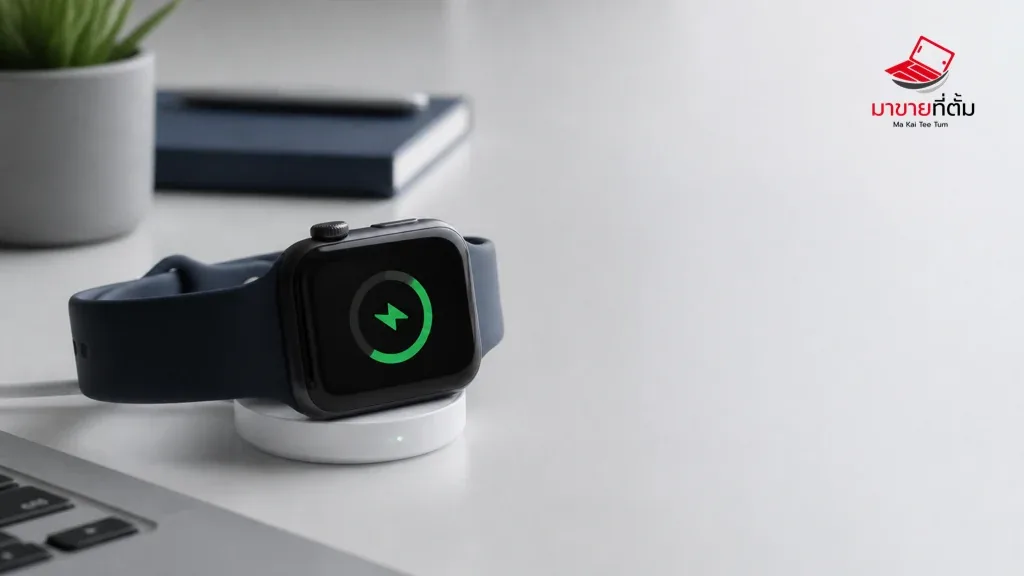
An Apple Watch that does not show a charging symbol may have a poor magnetic connection, an unsuitable cable, a depleted battery that needs time, or a battery and charging fault. Work from the charger outward before assuming the watch needs a replacement battery.
Checks to try first
- Use a compatible Apple Magnetic Charging Cable or USB‑C Magnetic Fast Charging Cable
- Clean and dry the back of the watch and charger, then align the magnet carefully
- Try a known-good power adapter and outlet, looking for the lightning-bolt charging icon
- If the display is blank, leave it charging for about 30 minutes before trying the side button
- Remove a case that prevents contact and check Battery Health if the watch starts
When the device needs further help
No charging symbol with a known-good cable and adapter, unusual heat, swelling, liquid exposure, or impact is a reason to stop charging and arrange service.
Bottom line
Start with reversible checks that do not erase personal data, then isolate the accessory, setting, network, or hardware involved. If the symptom survives the basic steps or follows impact or liquid exposure, professional assessment is safer than repeated resets.
Thinking about selling or upgrading an Apple device?
If the problem is part of an upgrade decision, MaKaiTeeTum can help assess an iPhone, iPad, Mac, or Apple Watch and discuss your selling options. Describe the real condition and repair history for a more useful valuation.
- Call: 064-564-7945
- Line ID: @KunTum