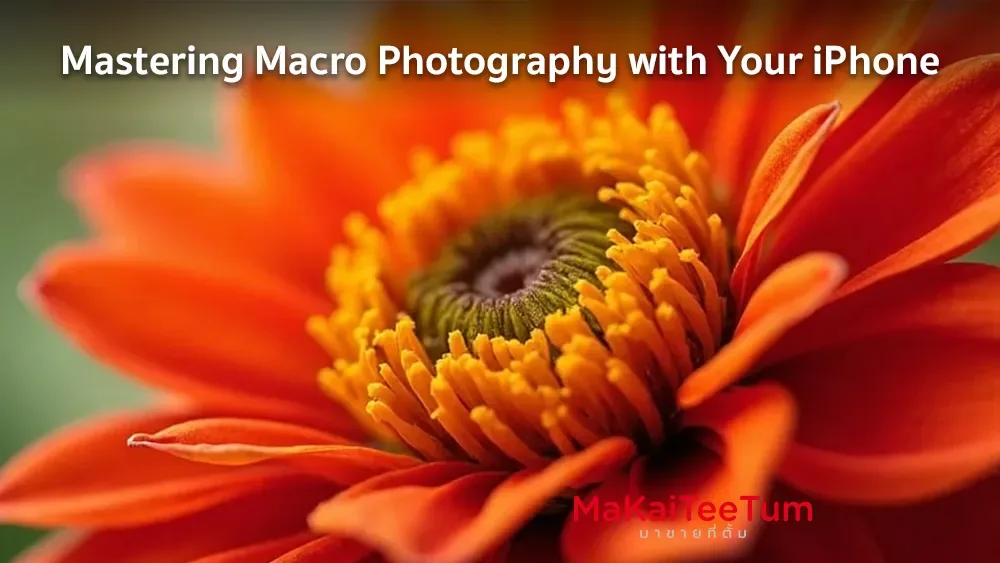
Macro photography allows photographers to capture intricate details of small subjects, revealing a world often unseen by the naked eye. With advancements in technology, recent iPhone models have made macro photography more accessible than ever. This guide will explore how to utilize your iPhone for macro photography, offering tips, techniques, and recommended tools to help you capture breathtaking close-up shots.
Understanding Macro Photography on iPhone
Macro photography involves taking close-up images of small subjects, highlighting details that are typically overlooked. Recent iPhone models, such as the iPhone 13 Pro, iPhone 13 Pro Max, and newer versions, are equipped with an Ultra Wide camera that supports macro photography. When you bring your iPhone close to a subject (as near as 2 centimeters), the camera automatically switches to the Ultra Wide lens to enable macro mode. This feature allows you to capture sharp and detailed close-up photos and videos.
Setting Up Macro Mode on Your iPhone
To make the most of the macro photography feature:
Enable Macro Control: Go to Settings > Camera, and turn on “Macro Control.” This setting allows you to manually control the automatic switching to macro mode, giving you more flexibility when shooting close-ups.
Using Macro Mode:
- Open the Camera app.
- Ensure the camera is in Photo or Video mode.
- Move the iPhone close to your subject (within 2 centimeters).
- The camera will automatically switch to the Ultra Wide lens for macro photography.
- Tap the Shutter button to capture the photo or the Record button to start and stop video recording.
Techniques for Capturing Stunning Macro Shots
To enhance your macro photography:
- Lighting: Utilize natural light when possible. Early morning or late afternoon provides soft, diffused light ideal for macro shots. Avoid direct sunlight, which can create harsh shadows.
- Stability: Keep your iPhone steady to prevent blur. Using a tripod or stabilizing your hands against a surface can help maintain sharpness.
- Focus and Framing: Tap the screen to set focus on the desired area. Experiment with different angles and compositions to find the most compelling shot.
- Use Burst Mode: For moving subjects like insects, use Burst Mode by holding down the shutter button to capture multiple shots, increasing the chance of getting a clear image.
Recommended Apps for Macro Photography
Enhance your macro photography experience with these apps:
- Halide Mark II: A professional camera app offering manual controls, including focus, exposure, and macro mode.
- Camera+ 2: Features a dedicated macro mode and advanced editing tools to refine your images.
- ProCamera: Provides extensive manual controls and supports macro photography, along with various shooting modes.

Accessories to Elevate Your Macro Photography
Consider these accessories to further enhance your macro shots:
- External Macro Lenses: Attachable lenses, such as those from Olloclip or Moment, can provide greater magnification and detail.
- Tripods: A stable tripod helps eliminate camera shake, crucial for sharp macro images.
- Lighting Equipment: Portable LED lights can provide consistent and adjustable lighting, especially in low-light conditions.
Editing Your Macro Photos
Post-processing can enhance the quality of your macro shots:
- Adjust Exposure and Contrast: Fine-tune brightness and contrast to highlight details.
- Sharpening: Apply sharpening to enhance the clarity of intricate details.
- Crop and Straighten: Focus on the subject by cropping out distracting elements and straightening the image.
Recommended Apps for Editing Macro Photos
After capturing your macro shots, post-processing is essential to make your images truly stand out. Here are some highly recommended apps:
- Snapseed: A powerful photo editor with selective adjustment tools, perfect for enhancing specific details in macro images.
- Adobe Lightroom: Ideal for fine-tuning colors and sharpening your macro photos for a more professional look.
- VSCO: Known for its beautiful filters, VSCO is great for adding depth and character to your macro photography.
Conclusion
Macro photography with your iPhone opens up a new realm of creative possibilities, allowing you to capture the minute details of the world around you. By understanding the features of your iPhone, utilizing proper techniques, and employing helpful accessories and apps, you can take stunning macro photographs that showcase the beauty in the small things.