In an era where smartphones have become an essential part of daily life, protecting the data on your device is more important than ever—especially when your device is lost or stolen. Apple has developed Stolen Device Protection, a new security feature in iOS 18 designed to strengthen the protection of users’ personal information.
What is Stolen Device Protection
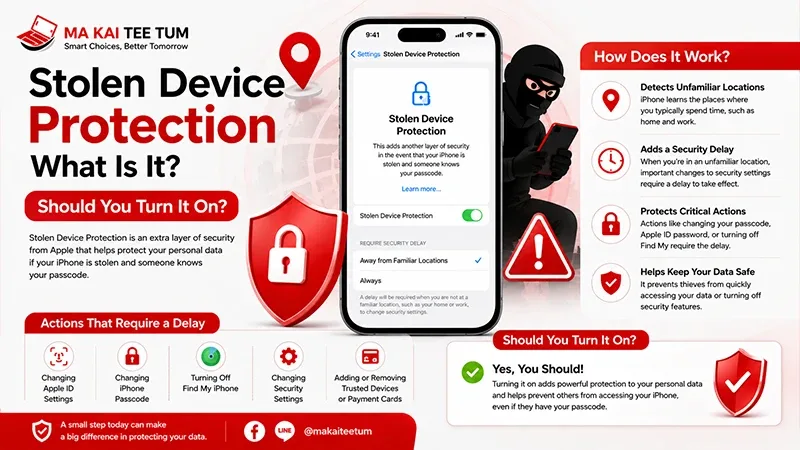
Stolen Device Protection is a feature Apple designed to reduce risks when an iPhone is stolen. It focuses on protecting user data and accounts, even if someone knows your device passcode. You can enable it by going to Settings > Face ID & Passcode, then toggling on Stolen Device Protection for full functionality.
How Stolen Device Protection Works
When enabled, Stolen Device Protection adds another layer of defense if your device is outside familiar locations, such as your home or workplace. This mechanism works in conjunction with the Security Delay feature.
What is Security Delay
Security Delay activates when your device is in an unfamiliar location. If an action considered ‘sensitive’ is initiated, such as:
- Changing the Apple ID password
- Disabling Find My iPhone
- Erasing all data on the device
The user must first verify identity using Face ID or Touch ID. Then, the system enforces a 1-hour delay before allowing the action to proceed, followed by another biometric verification. This mechanism reduces risk even if thieves know your passcode, since they cannot immediately alter settings or steal data.
Before Your Device is Stolen: How to Prepare
Preparation is key to minimizing loss, especially for devices that store personal information like an iPhone. Here are some essential steps to take in advance:
- Enable Stolen Device Protection: The most important first step so the system can protect you once the device is lost.
- Set up Face ID or Touch ID completely and avoid sharing your passcode with others.
- Enable Find My iPhone to locate your device when needed.
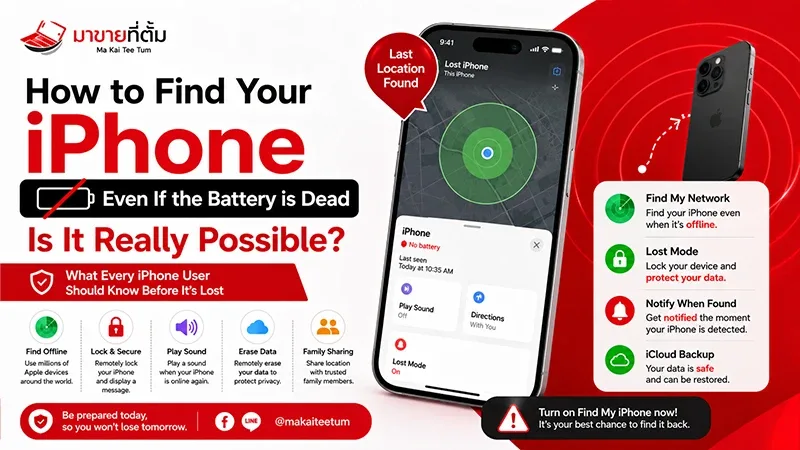
- Enable Find My Network so that even when your iPhone is off or the battery is dead (on supported models), its location can still be detected.
- Back up data to iCloud regularly to avoid data loss.
Find My Network and Device Tracking
Apple has upgraded the Find My Network feature to locate an iPhone even when it’s turned off or the battery is dead. The system leverages Bluetooth signals from nearby Apple devices to increase the chances of recovery effectively.
Why Stolen Device Protection Matters
Before Stolen Device Protection existed, if someone knew your passcode (for example, by watching you unlock it), they could immediately access important data such as photos, passwords stored in iCloud Keychain, or even disable Find My. With the new system, any high-privilege actions must go through biometric verification and a Security Delay.
Therefore, even if thieves know your password, they cannot perform any critical actions instantly—giving you time to lock the device or report the theft before data is exposed.
How to Enable Stolen Device Protection
Activating this feature is simple and takes only a few steps:
- Open Settings on your iPhone
- Select Face ID & Passcode
- Scroll down to find Stolen Device Protection
- Tap to turn it on and confirm with Face ID/Touch ID
Additional Tips for Better Security
- Create a strong passcode. Avoid birthdays or easily guessed numbers.
- Enable Two-Factor Authentication for your Apple ID.
- Do not store passwords or sensitive data in plain text on your device.
- Regularly update to the latest iOS version to ensure maximum protection.
What to Do if Your iPhone is Lost or Stolen
- Use the Find My app to locate your device and enable Lost Mode.
- Report the incident to local authorities with your device’s IMEI number.
- If recovery is impossible, remotely erase your data through iCloud.com.
Frequently Asked Questions (FAQ)
Which models support Stolen Device Protection?
This feature is available on devices running iOS 18 and later, supporting all iPhone models with Face ID.
What happens if I turn off Stolen Device Protection?
Turning off the feature disables Security Delay, making it easier for unauthorized individuals to alter key settings.
Does enabling it affect battery life?
It has little or no impact on battery life because the system operates only when the device is outside familiar locations.
Conclusion
Stolen Device Protection and the Security Delay system mark a significant advancement in Apple’s efforts to enhance iPhone security. These features not only prevent thieves from accessing sensitive data but also give users the crucial time needed to take proper action. Together, they make the iPhone smarter and more secure than ever.
References
- Apple Support: About Stolen Device Protection for iPhone
- Apple Platform Security Guide: security.apple.com
- Apple Support: If your iPhone, iPad, or iPod touch is lost or stolen